Project Management

If you run a small business, choosing the right small business project management software might be the single most impactful operational decision you make in 2026. Not because technology is trendy, but because the way small teams get work done has fundamentally shifted — and the tools that served you five years ago are no longer enough. Whether you are managing a five-person retail operation, a growing consultancy, or a service business with remote staff, the chaos of juggling tasks across email threads and WhatsApp groups is quietly costing you time and money every single day.
The good news is that you do not need to be a tech expert to benefit from small business project management software. In fact, the best tools in 2026 are designed specifically for business owners who have zero interest in learning complicated systems. They are built around familiar interfaces — feeds that look like social media, chats that feel like messaging apps — so your team can get started without a week of training. The challenge is knowing what to look for and where to begin.
This guide walks you through everything you need to know: why non-tech small business owners need a PM system, what features actually matter, how to evaluate your options, and how to get your team on board without resistance. No jargon, no fluff — just practical guidance grounded in how real small businesses operate today.
Why Small Business Project Management Software Matters More Than Ever in 2026
Small businesses are under more operational pressure than ever. McKinsey research consistently shows that teams without centralized work coordination spend a disproportionate amount of time on status updates, searching for files, and duplicating work — time that small businesses simply cannot afford to waste. For non-tech owners, this problem is even more acute because the workarounds tend to be messier: sticky notes, long email chains, and group chats that mix personal and professional conversations.
In 2026, hybrid and remote work arrangements are the norm rather than the exception for small businesses. Your team might be split across locations, time zones, or even working part-time from home. Without a shared system for task tracking and project execution, critical information falls through the cracks. Deadlines get missed not because people are lazy, but because nobody has clear visibility over what is happening and who owns what.
Small business project management software solves this by creating one organized workspace where tasks, conversations, and files all live together. It replaces the noise of scattered communication with a clear, structured flow of work that everyone on the team can follow — regardless of their technical background.
Pain Point | Without PM Software | With PM Software |
|---|---|---|
Task visibility | Buried in emails and chats | Centralized and trackable |
File management | Scattered across drives and inboxes | Attached to relevant tasks |
Status updates | Manual check-ins needed | Real-time progress visible |
Team communication | Mixed with personal messages | Organized by project or team |
Onboarding new staff | Relies on word of mouth | Documented in one place |
The Real Cost of Running Your Business on WhatsApp and Email
Let's be honest — most small business owners still run their operations through WhatsApp groups and email threads. It works, sort of, until it doesn't. The moment your team grows beyond five people or your projects involve more than two moving parts, cracks start to appear. Messages get buried, context gets lost, and people make decisions based on outdated information.
Harvard Business Review reports that professionals spend an average of 28% of their workday reading and responding to email — a staggering figure for a small business owner who is already wearing multiple hats. When you add WhatsApp notifications and the mental overhead of tracking who said what in which chat, the productivity drain becomes very real.
Small business project management software is not just about task tracking. It is about reclaiming your mental bandwidth. When everything has a designated place — tasks, conversations, files, decisions — you stop spending energy trying to remember where something is and start spending it on actually running your business.
What to Look for in Small Business Project Management Software
Not all small business project management software is created equal. Some tools are built for enterprise teams with dedicated IT departments. Others are so bare-bones that they barely qualify as PM tools. As a non-tech business owner, here is what you should actually prioritize.
Simplicity First — Not Feature Overload
Your team will not use a tool that feels like a second job to learn. Look for software with an intuitive interface that mirrors tools your team already uses every day. A social media-style feed for updates, a chat interface that behaves like WhatsApp — these familiar patterns lower the barrier to adoption significantly. If your non-tech staff can figure it out in ten minutes, you have found a winner.
Task Tracking That Gives You Real Visibility
The core job of any PM software is making sure tasks do not fall through the cracks. Look for features that let you assign tasks to specific people, set due dates, track progress, and see at a glance what is overdue or blocked. This is what replaces the daily "where are we with this?" message in the group chat.
Built-in Communication — Not a Separate App
One of the biggest mistakes small businesses make is using one tool for task management and another for communication. This creates two separate streams of information that quickly fall out of sync. The best small business project management software includes built-in chat so that task context and conversation live in the same place.
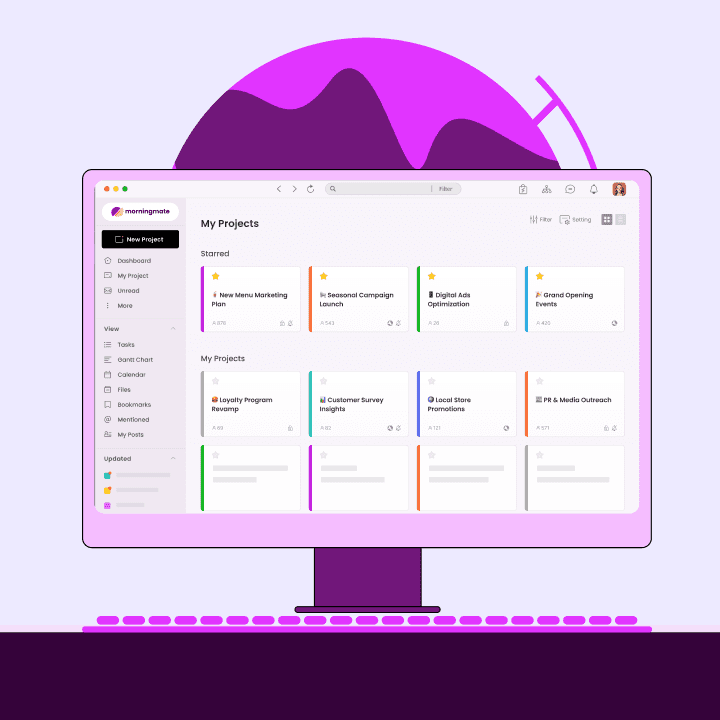
This is one area where Morningmate stands out. It combines task management with a built-in chat interface that works just like WhatsApp — familiar, fast, and context-aware. Over 550,000 teams use it to replace the chaos of scattered messaging with one organized workspace. The chat is tied directly to workspaces and projects, so conversations are always connected to the work they relate to.
File Management That Does Not Require a Filing System Degree
Files shared in WhatsApp disappear after a few days on most phones. Files in email require digging through hundreds of messages to find. Good PM software keeps files attached to the tasks or discussions they belong to, making retrieval instant and logical. This alone saves hours every week across a growing team.
Small Business Project Management Software: Comparing Your Options
The market for small business project management software in 2026 is crowded. Here is a practical comparison to help you navigate the main categories of tools and understand which type of small business each is best suited for.
The pattern is clear: tools built for enterprise teams overwhelm non-tech staff, while tools built purely for communication lack the structure you need to actually manage work. Lightweight PM software built specifically for small teams sits in the sweet spot — structured enough to give you visibility, simple enough that everyone actually uses it.
Tool Type | Best For | Drawback | Non-Tech Friendly? |
|---|---|---|---|
Enterprise PM (Jira, Asana) | Large tech teams | Steep learning curve, expensive | No |
Spreadsheet tools (Excel, Sheets) | Solo tracking | No collaboration or automation | Partially |
Messaging apps (WhatsApp, Slack) | Quick communication | No task tracking, info gets lost | Yes, but insufficient |
Lightweight PM (Morningmate) | Small and growing teams | Less suited for complex enterprise workflows | Yes — by design |
How to Roll Out Small Business Project Management Software Without Team Resistance
Choosing the right small business project management software is only half the battle. Getting your team to actually use it is where most business owners struggle. Gallup research on workplace engagement shows that teams are far more likely to adopt new tools when they see a clear personal benefit — not just an organizational one. Here is how to make that happen.
Step 1: Start With One Project, Not the Whole Business
Do not try to migrate everything at once. Pick one active project — ideally something with at least three people involved — and run it entirely through your new PM software for two weeks. Let the team experience the difference firsthand before expanding to other projects.
Step 2: Set a Clear Rule About Where Work Lives
The biggest adoption killer is running the PM tool in parallel with WhatsApp and email. If people can still get answers via text message, they will. Set a clear team norm: task assignments, deadlines, and file sharing happen in the PM software. Chat and updates happen in the PM software. This is not about control — it is about making sure nothing falls through the cracks.
Step 3: Make the First Week Easy
Pre-populate the tool with existing tasks before your team logs in for the first time. Nobody likes joining a blank workspace. When people arrive and see their actual work already organized and assigned, the tool feels immediately useful rather than like an empty burden. Morningmate's Feed view — which displays work updates in a familiar social media-style stream — makes this first login feel natural even for team members who have never used PM software before.
Step 4: Lead by Example
As the business owner or manager, your behavior sets the tone. If you keep sending task instructions via WhatsApp after launching the PM tool, your team will follow your lead. Make every task assignment, every project update, and every file share happen through the tool — visibly and consistently.
The Measurable Impact of Small Business Project Management Software
The question every business owner asks before committing to a new tool is simple: does it actually make a difference? The data for small business project management software adoption is encouraging. Teams that move from email and messaging apps to a dedicated PM system consistently report faster project completion, fewer dropped tasks, and less time spent in status meetings.
Beyond efficiency, there is a knowledge management benefit that often goes unnoticed. When your work lives in one organized system, your business becomes less dependent on any single person's memory. Information sharing across your team becomes automatic — new staff can get up to speed faster, and institutional knowledge does not walk out the door when someone leaves.
A Practical Checklist for Choosing the Right Small Business Project Management Software
Before you commit to any tool, run it through this checklist. These criteria are specifically weighted for non-tech small business owners who need something that works without a learning curve.
Can your least tech-savvy team member use it within 30 minutes? If the answer is no, move on.
Does it include built-in chat or messaging? Avoid tools that require a separate app for communication.
Does it support file attachments directly on tasks? Files and tasks should live together.
Can you assign tasks, set deadlines, and track progress without configuring anything first? Simplicity out of the box matters.
Is there a mobile app? Your team needs access on the go, not just at a desktop.
Is pricing transparent and affordable for a 5–50 person team? Watch for per-user costs that balloon as you grow.
Does the vendor offer onboarding support or resources? Even simple tools benefit from a helping hand at the start.
If you are looking for a starting point, Morningmate checks every one of these boxes. It is built as lightweight small business project management software — robust enough for serious task coordination and project execution, but simple enough that non-tech teams across industries, from construction to retail to consulting, use it without any training overhead.
Making the Switch: Your 30-Day Plan for Small Business Project Management Software
A structured rollout makes the difference between a tool that sticks and one that gets abandoned after a week. Here is a simple 30-day plan designed for non-tech small business owners adopting PM software for the first time.
Week 1: Set Up and Seed
Create your workspace, set up your team's accounts, and add your three most active current projects. Populate each project with the tasks that are already in progress. Assign owners and due dates. Do not worry about perfection — just get the basics in so the tool feels alive when your team arrives.
Week 2: Run One Project Through the Tool
Pick your highest-priority active project and commit to managing it entirely through the PM software. All task updates, file sharing, and project-related chat happen in the tool. This is your proof of concept — your team will see the value firsthand without feeling like the whole business has changed overnight.
Week 3: Expand and Standardize
Add the rest of your active projects. Establish simple team norms: how tasks get named, who is responsible for updating status, how often the team checks the feed. Keep the rules minimal — three clear norms are better than ten rules nobody follows.
Week 4: Review and Refine
Hold a brief team check-in — fifteen minutes is enough — to gather feedback. What is working? What feels clunky? Make small adjustments to how you have set things up. By the end of week four, small business project management software should feel like a natural part of how your team works, not an extra layer of admin.
The Bottom Line on Small Business Project Management Software in 2026
Running your business on email threads and WhatsApp groups might feel familiar, but it comes with a hidden cost: missed tasks, scattered files, wasted time, and a team that never has quite enough visibility to do its best work. The right small business project management software changes all of that — without requiring you or your team to become tech experts.
In 2026, the bar for adoption has never been lower. Tools like Morningmate are designed from the ground up to feel intuitive — a familiar feed-style interface, WhatsApp-like built-in chat, and task tracking that gives you and your team real visibility without any configuration headaches. Whether your team is fully remote, hybrid, or all in one place, small business project management software gives you the organizational backbone your growing business needs.
Start small, be consistent, and let the tool do the heavy lifting. Your future self — the one who is not spending Sunday night hunting for a file buried in a three-month-old WhatsApp thread — will thank you.