Project Management

Collaborative project management for distributed teams has never been more critical — or more complex — than it is heading into 2026. As organizations stretch across time zones, cities, and continents, the pressure to keep projects moving without losing people in the process is real and constant. Whether you are running a 15-person startup with half the team remote or leading operations at a growing company with offices in three countries, the challenge is the same: how do you get everyone working toward the same goal without drowning in chat threads, missed updates, and duplicated effort?
The good news is that collaborative project management for distributed teams has matured significantly. The tools, frameworks, and habits that actually work are clearer now than they were even two years ago. The bad news is that many teams are still relying on a patchwork of email, WhatsApp groups, and spreadsheets — a combination that creates more chaos than clarity. If that sounds familiar, this guide is for you.
This article walks through what the latest research says about distributed team performance, where most teams go wrong, and what collaborative project management for distributed teams looks like when it is done well. You will find practical frameworks, real-world comparisons, and specific tool recommendations grounded in how teams actually work today.
Why Collaborative Project Management for Distributed Teams Is Harder in 2026
The shift to distributed work is no longer a temporary adjustment — it is the default for a growing share of the global workforce. McKinsey research has consistently shown that hybrid and fully remote models are here to stay, with the majority of knowledge workers preferring flexible arrangements. But flexibility without structure creates a coordination vacuum.
In distributed environments, three specific problems surface again and again. First, async communication breaks down because there is no shared system — decisions get buried in Slack threads or, worse, personal WhatsApp messages that others cannot access. Second, task visibility disappears as each person tracks their own work in isolation. Third, knowledge management suffers because there is no single source of truth for project history, file versions, or task status.
These are not small inconveniences. Asana's Anatomy of Work report found that employees spend a significant portion of their week on work about work — chasing status updates, searching for files, and attending meetings that exist only because no one has a clear view of project progress. Collaborative project management for distributed teams is the direct fix for all three of these failure points.
Here is a quick breakdown of where traditional approaches fall short compared to structured collaborative PM:
Pain Point | Email + WhatsApp Approach | Structured Collaborative PM |
|---|---|---|
Task visibility | Fragmented, manual check-ins needed | Centralized, always up to date |
Decision tracking | Lost in thread history | Documented alongside tasks |
File management | Scattered across email attachments | Stored in context with the task |
Async communication | No structure, easy to miss | Threaded, searchable, context-rich |
Onboarding new members | Requires manual briefing | Self-serve via shared workspace |
The Real Cost of Poor Collaborative Project Management for Distributed Teams
Before looking at solutions, it is worth understanding the scale of the problem. Teams that rely on disconnected tools lose hours every week not to actual work, but to the overhead of managing information across too many places. This is not a minor inefficiency — it compounds into missed deadlines, duplicated work, and frustrated people who feel like they are always playing catch-up.
Research published in Harvard Business Review on collaborative overload shows that the demand on employees for cross-team work has grown dramatically, but without the right systems in place, more collaboration actually reduces productivity rather than improving it. The key distinction is between structured collaboration — which scales — and unstructured collaboration, which burns people out.
Core Pillars of Collaborative Project Management for Distributed Teams
Getting collaborative project management for distributed teams right is not about adopting the most feature-rich tool on the market. It is about aligning your team around four core pillars that make distributed project execution actually work.
1. A Single Source of Truth for Tasks
Every distributed team needs one place where all tasks live — with clear owners, due dates, and status labels. When task tracking happens in multiple places (one person uses Notion, another uses a spreadsheet, someone else relies on chat reminders), nothing is reliable. A shared task workspace eliminates that ambiguity and gives everyone — including managers and executives — instant visibility into what is moving and what is stuck.
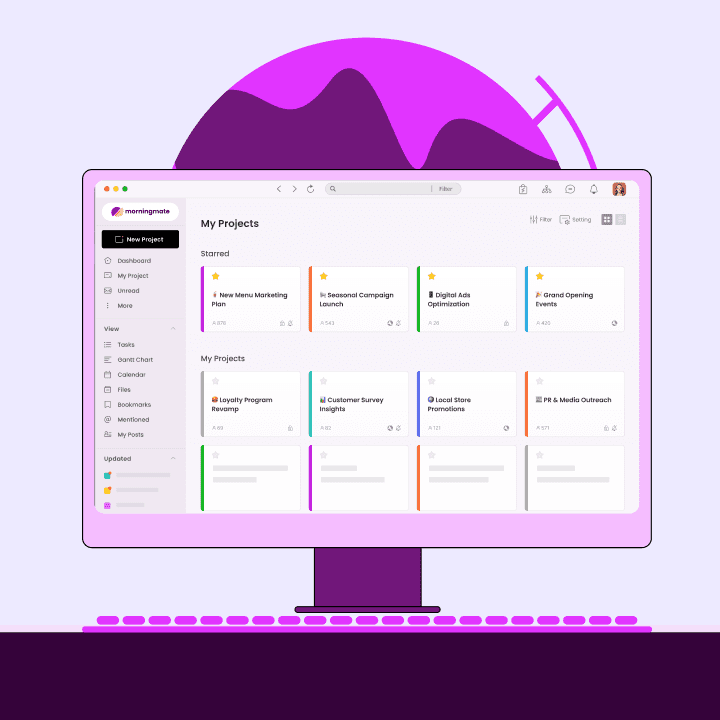
This is where tools like Morningmate make a meaningful difference. Morningmate is a lightweight work management tool that combines task management with built-in chat and file management in one workspace. Instead of toggling between a PM tool, a messaging app, and a shared drive, your team handles everything in one place — making collaborative project management for distributed teams far less fragmented.
2. Async-First Communication Norms
Distributed teams span time zones. Expecting everyone to be available simultaneously is unrealistic and exhausting. Async-first communication means structuring your updates, decisions, and discussions so they do not require real-time presence. This means detailed task comments instead of quick pings, recorded decisions logged in the project workspace, and clear response time expectations set at the team level.
When you build your collaborative project management for distributed teams around async habits, you stop losing context every time someone logs off — and you start building a searchable record of how work actually happened.
3. Structured Knowledge Management
Knowledge sharing is the quiet backbone of project execution. Every time someone has to ask "where is that file?" or "what was the decision on X?", you are looking at a knowledge management failure. Distributed teams need a system where project files, meeting notes, and decisions are stored in context — attached to the relevant task or project post, not buried in email chains.
4. Consistent Visibility for Leadership
For operations leads and business owners, collaborative PM is also about managerial visibility. You should be able to look at a project board and immediately understand where things stand — without calling a meeting or chasing people for updates. Building that visibility into your workflow from day one changes how leadership makes decisions and how quickly teams can course-correct.
Choosing the Right Tools for Collaborative Project Management for Distributed Teams
Tool selection matters, but the most common mistake teams make is choosing tools based on feature lists rather than actual team behavior. A tool that requires significant onboarding and configuration might be perfect for a 200-person tech company but completely wrong for a 20-person marketing agency or a field operations team with no technical background.
The right tool for collaborative project management for distributed teams should feel intuitive from day one. That is one reason Morningmate resonates with non-tech teams — its Feed view works like a social media timeline, and its built-in chat mirrors the interface of messaging apps people already use daily. There is almost no learning curve, which means adoption actually happens instead of stalling out after the first week. Morningmate is trusted by over 550,000 teams worldwide, which reflects how effectively it lowers the barrier to getting distributed teams organized.
That said, no single tool fits every team. Here is a practical comparison to help you evaluate options against your team's actual needs:
If you are currently managing projects through a mix of WhatsApp and email, the most important upgrade you can make is moving to a workspace where tasks, files, and conversations live together. You do not need to start with the most powerful tool — you need to start with one your team will actually use consistently.
Team Profile | Key PM Need | Recommended Approach |
|---|---|---|
10–30 person remote team, non-tech | Simple task tracking + chat in one place | Lightweight unified tool (e.g., Morningmate) |
50–100 person hybrid company | Cross-team visibility + async updates | Structured workspace with project boards |
Growing startup, multiple departments | Centralized knowledge management | Tool with file + task + chat integration |
Executive or ops lead | High-level project status at a glance | Dashboard or Feed view with clear statuses |
A Practical Framework for Setting Up Collaborative Project Management for Distributed Teams
Rolling out a new PM approach does not have to be a months-long initiative. Here is a straightforward five-step framework you can implement in a single week.
Audit where work currently lives. List every tool your team uses to communicate and track work. Note where the biggest gaps are — usually status updates, file storage, or decision history.
Pick one workspace and commit to it. The goal is consolidation. Choose a tool that covers task tracking, file sharing, and team chat together. Partial adoption of multiple tools just recreates the same fragmentation problem.
Define your project structure upfront. Before inviting the team, set up your project spaces with clear naming conventions, task categories, and status labels. This makes it immediately usable rather than a blank slate that nobody knows how to start with.
Establish async communication norms. Decide what deserves a real-time meeting versus what should be an async update. Write this down and share it with the team — it sounds simple but it changes behaviour significantly.
Review and iterate every two weeks. Collaborative project management for distributed teams is not a one-time setup. Check in regularly on what is working and what is still falling through the cracks. Adjust your task workflow and communication habits accordingly.
What Good Collaborative Project Management for Distributed Teams Looks Like in Practice
Consider a mid-sized marketing agency with 40 people across four countries. Before moving to a structured collaborative PM approach, the team ran projects through a combination of email chains and a WhatsApp group per client. Files were shared via Google Drive links buried in chat. Status updates happened in weekly video calls that felt necessary but were actually just catch-up sessions.
After consolidating into a single unified workspace with proper task tracking and built-in communication, the team saw weekly status meetings drop from five to two. Project managers could see task progress without sending a single follow-up message. New team members could get up to speed on a project's history by reviewing the task feed and attached files — without needing a dedicated onboarding call.
That is the tangible payoff of collaborative project management for distributed teams done right. It is not just about tools — it is about the habits and structure those tools enable. For teams looking to improve async communication and reduce the noise of scattered messages, the shift to a unified workspace is the single highest-leverage change you can make.
Making Collaborative Project Management for Distributed Teams Stick Long-Term
The biggest reason collaborative project management for distributed teams fails is not poor tool choice — it is inconsistent adoption. One person keeps using email, another reverts to WhatsApp, and within a month the new system is half-empty. Sustaining the shift requires making the workspace the default path of least resistance for every interaction that matters.
A few things that consistently drive long-term adoption:
Managers lead by example — if the team lead posts updates in the workspace, others follow
Tasks are only considered "real" if they exist in the shared workspace — nothing tracked outside the system counts
Files shared via chat or email are redirected to the workspace within 24 hours
New members are onboarded into the workspace on day one, not introduced to it weeks later
Regular retrospectives include a check on how well the team is using the workspace — not just whether projects are on track
Morningmate's Feed view — which mirrors the social media experience most people already navigate daily — significantly lowers the resistance to checking in. When your workspace feels as familiar as scrolling a feed rather than navigating a complex dashboard, people actually use it. That ease of use is what makes collaborative project management for distributed teams sustainable, not just theoretically sound.
Collaborative project management for distributed teams in 2026 is not optional for growing companies — it is the operational foundation that everything else builds on. When your task workflow is clear, your knowledge management is centralized, and your team communication happens in context rather than scattered across apps, projects move faster and people feel less overwhelmed. Start with the structure, pick a tool that your whole team can actually use, and build the habits that turn a good system into a great one. You can explore how remote team communication tools complement your PM setup to get even more out of your distributed workflow.