Project Management
A team workspace with chat and tasks is no longer a nice-to-have for small teams — it is the backbone of how work actually gets done. When your team is juggling client deadlines, internal projects, and day-to-day communication all at once, scattered tools create friction that quietly slows everything down. Email threads get buried, WhatsApp messages disappear into group chats, and nobody can tell what the status of a project actually is.
Small teams feel this pain more acutely than large enterprises. You do not have dedicated project managers or operations staff to chase updates and consolidate information. Every person on the team wears multiple hats, which means every minute spent searching for a file or re-reading a conversation thread is a minute taken away from actual work. A team workspace with chat and tasks solves this by putting communication and work coordination in one place.
The good news is that the solution does not have to be complicated. In fact, for small teams, simplicity is everything. The right team workspace with chat and tasks should feel intuitive from day one — not like a system you need to train your entire team to use. Let's look at what that actually means in practice.
Why Small Teams Struggle With Communication and Task Tracking
Most small teams start out using whatever tools are already familiar: email for formal communication, WhatsApp or iMessage for quick questions, and maybe a spreadsheet to track tasks. This works fine at first. But as the team grows and projects multiply, the cracks start to show.
According to McKinsey Global Institute, employees spend nearly 20% of their workweek searching for internal information or tracking down colleagues to get answers. For a five-person team, that is essentially one full-time equivalent being spent just on information retrieval. A unified team workspace with chat and tasks can dramatically cut that number.
The core problem is fragmentation. Tasks live in one place, conversations live in another, and files are scattered across email attachments and cloud storage folders. When context is split across tools, your team constantly has to context-switch — and that is expensive in terms of focus and time.
Pain Point | Fragmented Tools (Email + WhatsApp) | Team Workspace With Chat and Tasks |
|---|---|---|
Finding past decisions | Searching through email chains and chat history | Linked to the relevant task or project post |
Task status visibility | Ask someone or dig through a spreadsheet | Real-time status visible to everyone |
File access | Scattered across email and personal drives | Attached directly to tasks and posts |
Onboarding new members | Manual briefing needed every time | New members can scroll and get context instantly |
The Real Cost of Tool Fragmentation for Small Teams
When communication and task workflow live in different apps, the cost compounds quickly. It is not just about time lost — it is about decisions being made without full context, tasks slipping through the cracks, and team members feeling like they are always behind. Asana's Anatomy of Work report found that workers switch between apps more than 25 times per day, leading to significant drops in deep focus and output quality.
For small teams especially, this matters. When your team has ten people instead of a hundred, every single person's clarity and focus has outsized impact. One missed task or miscommunication can delay an entire project. A proper team workspace with chat and tasks removes that risk by keeping everything in one thread of context.
What to Actually Look for in a Team Workspace With Chat and Tasks
Not all tools marketed as collaborative workspaces are built the same way. Some are so feature-heavy that they require dedicated training just to get started. Others are too lightweight and leave gaps that send your team back to WhatsApp. When evaluating a team workspace with chat and tasks for a small team, focus on these criteria.
1. Chat That Is Built In, Not Bolted On
There is a meaningful difference between a tool that integrates with a chat app and one that has chat built natively into the workspace. When chat is native, conversations stay connected to the work they relate to. You can discuss a task right inside it, tag a teammate, and come back later to find the full context without digging through a separate app.
2. Task Tracking That Does Not Require a Training Manual
Complex task management tools like Jira or Asana are powerful, but they carry steep learning curves. For a small team — especially one in a non-technical field — the overhead of setting up workflows, learning terminology, and managing permissions can be more trouble than it is worth. The ideal team workspace with chat and tasks should let anyone on the team create, assign, and update tasks within minutes of signing up.
3. Centralized File and Knowledge Management
Files should live where the work lives. A good team workspace with chat and tasks allows you to attach files directly to tasks and posts, so when someone needs a document six weeks later, they know exactly where to find it — no more hunting through email attachments or asking "who has the latest version?"
4. A Feed That Gives You the Full Picture
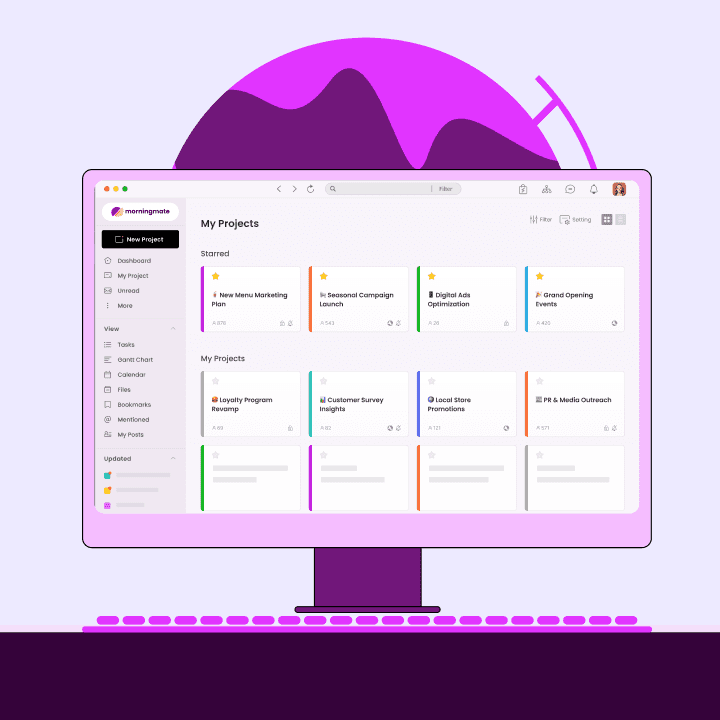
One underrated feature is a social-media-style activity feed. When your team posts updates, shares files, or moves tasks forward, a feed view lets everyone stay informed without attending yet another status meeting. This is the model that tools like Morningmate use — a lightweight work management platform where the main view looks like a familiar social feed, making it easy for even non-technical team members to stay in the loop without any onboarding friction.
How to Set Up a Team Workspace With Chat and Tasks the Right Way
Choosing the right tool is only half the equation. How you set it up determines whether your team actually adopts it. Here is a practical framework for getting your team workspace with chat and tasks off the ground quickly.
Step 1: Define your spaces before you invite your team. Create one space or channel per project or department. Resist the temptation to create a space for every micro-topic — too many spaces creates the same noise problem you are trying to solve.
Step 2: Migrate one active project first. Do not try to move everything at once. Pick one ongoing project, create the tasks, invite the relevant teammates, and run that project entirely through the new workspace for two weeks. This builds familiarity with low risk.
Step 3: Set a clear norm around chat. Decide together that work-related chat goes through the workspace, not WhatsApp. This sounds simple, but it is the most important cultural shift. When the team commits to this, the tool becomes the single source of truth almost immediately.
Step 4: Use task assignments, not just messages. Anytime someone is asked to do something in a chat, convert it into a task with a due date and an assigned owner. This is where a team workspace with chat and tasks truly earns its place — it turns conversations into accountability.
Step 5: Review and clean up weekly. Spend ten minutes each Friday checking open tasks. Close what is done, update what has moved forward, and flag anything blocked. This habit keeps the workspace clean and useful rather than becoming a digital graveyard of forgotten to-dos.
Comparing Your Options: Team Workspace With Chat and Tasks
The market for team collaboration tools is crowded, and it can be hard to know which one fits a small team's needs without overcomplicating things. Here is a practical comparison to help frame your decision.
Morningmate is built specifically to replace the chaos of email threads and personal messenger apps without replacing them with a complicated system. Its built-in chat works like a familiar WhatsApp-style interface, so your team can message, assign tasks, share files, and track progress — all inside one team workspace with chat and tasks. It is currently used by over 550,000 teams globally, including many small businesses and non-technical teams who needed something simpler than Jira but more structured than a group chat.
Harvard Business Review consistently highlights that team performance improves when communication and coordination happen in shared, transparent systems rather than siloed personal channels. A proper team workspace with chat and tasks is exactly that kind of shared system.
Tool Type | Best For | Drawback for Small Teams | Chat + Tasks Unified? |
|---|---|---|---|
Email + WhatsApp | Familiarity | No task tracking, context lost fast | No |
Slack + Trello | Mid-size tech teams | Two separate tools, cost adds up | Partial (integration only) |
Jira / Asana | Large engineering teams | Steep learning curve, overkill for small teams | Partial |
Morningmate | Small to mid-size non-tech teams | Fewer advanced automations than enterprise tools | Yes — fully unified |
The Measurable Impact of Switching to a Unified Team Workspace With Chat and Tasks
Teams that move from fragmented tools to a unified team workspace with chat and tasks typically see improvements across three areas: communication speed, task completion rates, and team visibility. The shift does not happen overnight, but most teams report a noticeable difference within the first month of consistent use.
If you are managing a hybrid team or an async-first remote setup, the gains are even more pronounced. When your team is not always online at the same time, a shared workspace becomes the connective tissue that keeps work moving without requiring everyone to be present simultaneously. Learn more about choosing the right remote collaboration tools for your setup.
Making Your Team Workspace With Chat and Tasks Stick Long-Term
The biggest reason collaborative tools fail is not poor features — it is poor adoption. People revert to what is familiar, especially under pressure. Here are the habits that make a team workspace with chat and tasks become genuinely indispensable rather than just another tab nobody opens.
Lead from the top. If you are the manager or business owner, use the workspace visibly. Post updates, comment on tasks, and ask questions through the platform. Your team will follow what they see you doing.
Kill the parallel channel. Formally agree to stop using WhatsApp for work updates. This is the single most effective behavior change you can make.
Celebrate wins in the workspace. When a project closes or a milestone is hit, post it in the workspace. It builds culture and reinforces that the platform is where real work and real moments happen.
Keep tasks clean. Archive or close completed tasks regularly. A cluttered task list is discouraging. A lean, up-to-date one is motivating.
Use it for onboarding. When a new team member joins, point them to the workspace as their first orientation. This instantly signals that it is the source of truth for your team's work.
Tools like Morningmate make this easier because the interface requires almost no onboarding. The feed view is familiar, the chat works like an app your team already uses every day, and task creation takes seconds. When a tool feels natural, adoption is not a battle — it just happens. You can explore how this kind of lightweight project management approach works across different team sizes and industries.
Your Small Team Deserves a Team Workspace With Chat and Tasks That Actually Works
Small teams move fast, and the tools you use should keep up — not slow you down. A proper team workspace with chat and tasks gives every person on your team the clarity to know what needs doing, the context to understand why it matters, and the channel to communicate about it without switching apps twenty times a day.
You do not need enterprise-grade complexity to run a tight, well-coordinated team. You need one place where chat and tasks live together, where files stay attached to the work they belong to, and where the whole team can see what is happening without asking for a status update. That is exactly what a team workspace with chat and tasks is built to do — and for small teams especially, that simplicity is its greatest strength.
Whether you are leading a remote team juggling async communication, running operations across a hybrid model, or simply tired of important decisions getting lost in a WhatsApp group, the shift to a dedicated team workspace with chat and tasks is one of the highest-return changes you can make for your team this year. Start small, commit to it, and watch the clarity compound over time.