Project Management

Choosing the right team communication platform for small business is one of the most impactful decisions a non-technical team can make in 2026. When your crew is running on WhatsApp group chats and email chains, work gets lost, decisions go undocumented, and following up becomes a second job. If that sounds familiar, you are not alone — and there is a smarter way to work.
Most small businesses do not need enterprise-grade software with a steep learning curve. What they need is a team communication platform for small business that is simple enough for anyone to pick up on day one, yet structured enough to keep projects and conversations from falling through the cracks. The challenge is finding that balance — especially when your team might include a mix of shop floor workers, sales reps, and admin staff who are not exactly power users.
This guide walks you through exactly what to look for, what pitfalls to avoid, and how the right platform can transform the way your team coordinates day-to-day work — without adding more complexity to your plate.
Why Non-Technical Small Businesses Struggle With Team Communication
The communication problem in small, non-technical teams is not about effort — it is about tools that were never designed for them. Most team communication platforms for small business on the market are built with software developers or large enterprise teams in mind. They come packed with features that require training, onboarding, and a dedicated admin just to manage permissions.
Meanwhile, the workarounds most small businesses use — personal WhatsApp groups, email threads, spreadsheets — create a different kind of chaos. McKinsey research found that employees spend an average of 28% of their workweek managing email, a number that balloons even further when personal messaging apps enter the picture. That is more than a full working day lost every week, per person.
The result? Decisions made in a WhatsApp thread that nobody can find two weeks later. Tasks assigned verbally that never get tracked. Files shared over email that get buried under fifty other messages. A team communication platform for small business solves all of this — but only if it is the right fit for how your team actually works.
Here is a breakdown of the most common communication pain points non-technical small businesses face, compared to what a structured platform offers:
Pain Point | WhatsApp / Email Approach | Dedicated Team Communication Platform |
|---|---|---|
Finding past decisions | Scroll through hundreds of messages manually | Searchable, organized by project or topic |
Task tracking | Verbal or buried in chat history | Assigned, deadline-tracked, visible to all |
File sharing | Scattered across email attachments | Centralized, attached to relevant tasks or posts |
Onboarding new staff | No documentation, rely on word of mouth | Historical context available immediately |
Work visibility for managers | Must ask team individually for updates | Real-time progress visible at a glance |
The Real Cost of Scattered Communication in Small Teams
Before you can fix a problem, it helps to see its true scale. For small businesses running without a dedicated team communication platform for small business, the costs are often invisible until they snowball into something bigger — a missed deadline, a lost client, or a team member who quits because they feel constantly out of the loop.
Gallup research shows that unclear communication and lack of manager visibility are among the top drivers of employee disengagement. In a small team, disengagement hits harder — there is no buffer of extra headcount to absorb the slack. Every disconnected conversation has a real operational cost.
What to Look for in a Team Communication Platform for Small Business
Not every team communication platform for small business is created equal. For non-technical teams in particular, there are a handful of criteria that separate tools your team will actually adopt from tools that gather digital dust after week two.
1. Ease of Use Above Everything Else
If your team needs a training course to get started, that is already a red flag. A good team communication platform for small business should feel intuitive on day one — especially for team members who are not used to working with digital tools. Look for interfaces that mirror what people already know: familiar chat layouts, simple task cards, and no mandatory onboarding sessions.
2. Chat and Task Management in One Place
The biggest trap non-technical teams fall into is using one app for messaging and another for tasks — then spending half the day switching between them. The right team communication platform for small business keeps both in the same workspace. When a conversation about a project can live right next to the task itself, nothing gets lost in translation.
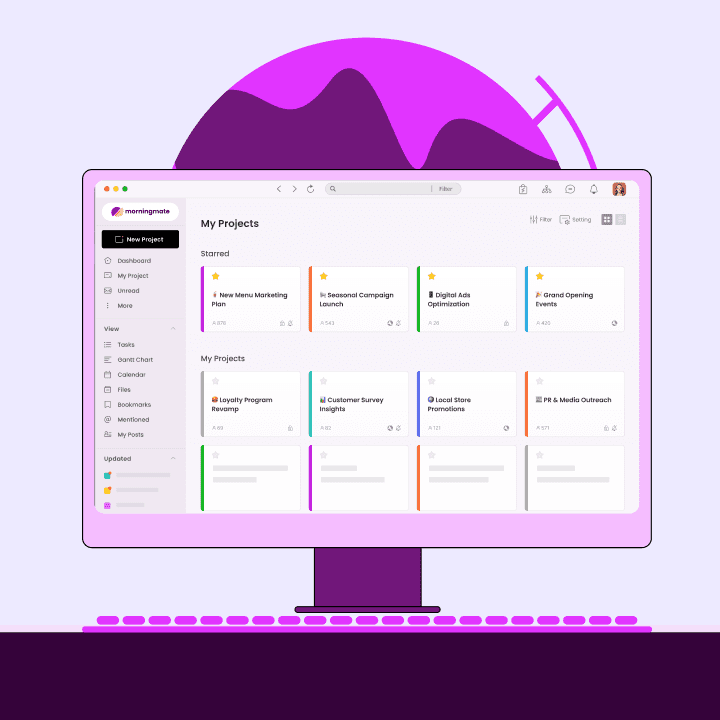
This is exactly the problem that Morningmate was built to solve. It combines a built-in chat — with a familiar interface similar to WhatsApp — alongside structured task management and file storage, all in one lightweight workspace. Over 550,000 teams use it precisely because it does not require a technical background to get value from it on day one.
3. Visibility for Managers Without Micromanaging
As a manager or business owner, you should not need to chase your team for status updates. A strong team communication platform for small business gives you a live view of what is in progress, what is completed, and what is stuck — without scheduling check-in meetings every morning.
4. Mobile-Friendly for On-the-Go Teams
Many small business teams are not desk-bound. Field workers, retail staff, and service teams all need to communicate and update tasks from their phones. Your team communication platform for small business must work just as well on mobile as it does on desktop — without a stripped-down, frustrating mobile experience.
Making the Final Call: Is Your Team Ready for a Team Communication Platform for Small Business?
If your team is still relying on personal messaging apps and email to manage day-to-day work, the honest answer is: yes, you are ready — and the longer you wait, the more expensive the disorganization becomes. A dedicated team communication platform for small business does not have to be complicated, expensive, or disruptive to roll out. It just has to fit how your people actually work.
Use this quick checklist before you make your decision:
Does the platform require less than 30 minutes to get started without training?
Can your least tech-savvy team member use it without help after day one?
Does it keep chat, tasks, and files in one place?
Does it give managers visibility without requiring manual check-ins?
Does it work well on mobile for on-the-go team members?
Is the pricing reasonable for a team of 10–50 people?
If a platform checks all six boxes, it is worth a trial. If it checks four or fewer, keep looking. The right team communication platform for small business exists — and switching to it is one of the highest-leverage moves a small business leader can make in 2026. Your team's time, clarity, and momentum depend on it.
The Impact: What Changes When You Switch to the Right Team Communication Platform for Small Business
The shift from scattered messaging to a structured team communication platform for small business is not just about convenience — it produces measurable changes in how work gets done. Teams that make the switch consistently report faster decision-making, fewer dropped tasks, and significantly less time spent on follow-ups.
Morningmate's task coordination features — including task assignments, due dates, and status tracking — give managers real-time visibility without requiring constant check-in meetings. When paired with the built-in chat and centralized file management, teams find that information is always where they expect it to be. That alone removes a surprising amount of daily friction.
Making the Final Call: Is Your Team Ready for a Team Communication Platform for Small Business?
If your team is still relying on personal messaging apps and email to manage day-to-day work, the honest answer is: yes, you are ready — and the longer you wait, the more expensive the disorganization becomes. A dedicated team communication platform for small business does not have to be complicated, expensive, or disruptive to roll out. It just has to fit how your people actually work.
Use this quick checklist before you make your decision:
Does the platform require less than 30 minutes to get started without training?
Can your least tech-savvy team member use it without help after day one?
Does it keep chat, tasks, and files in one place?
Does it give managers visibility without requiring manual check-ins?
Does it work well on mobile for on-the-go team members?
Is the pricing reasonable for a team of 10–50 people?
If a platform checks all six boxes, it is worth a trial. If it checks four or fewer, keep looking. The right team communication platform for small business exists — and switching to it is one of the highest-leverage moves a small business leader can make in 2026. Your team's time, clarity, and momentum depend on it.
Comparing the Top Team Communication Platforms for Small Business in 2026
The market for team communication platforms for small business has grown significantly. Here is a practical comparison to help you cut through the noise and find the right fit for a non-technical team.
Platform | Best For | Non-Technical Friendly? | Chat + Tasks Together? |
|---|---|---|---|
Morningmate | Small to mid-size non-tech teams | Yes — WhatsApp-like interface | Yes, fully integrated |
Slack | Tech-forward teams with integrations | Moderate — channel setup can confuse | Chat only (tasks via add-ons) |
Asana | Project-heavy structured teams | No — steep learning curve | Tasks strong, chat limited |
Microsoft Teams | Enterprise with existing Microsoft stack | No — complex for small teams | Partially, via Planner |
WhatsApp Business | Customer messaging only | Yes — but not built for work coordination | No task management at all |
Platform | Best For | Non-Technical Friendly? | Chat + Tasks Together? |
|---|---|---|---|
Morningmate | Small to mid-size non-tech teams | Yes — WhatsApp-like interface | Yes, fully integrated |
Slack | Tech-forward teams with integrations | Moderate — channel setup can confuse | Chat only (tasks via add-ons) |
Asana | Project-heavy structured teams | No — steep learning curve | Tasks strong, chat limited |
Microsoft Teams | Enterprise with existing Microsoft stack | No — complex for small teams | Partially, via Planner |
WhatsApp Business | Customer messaging only | Yes — but not built for work coordination | No task management at all |
Platform | Best For | Non-Technical Friendly? | Chat + Tasks Together? |
|---|---|---|---|
Morningmate | Small to mid-size non-tech teams | Yes — WhatsApp-like interface | Yes, fully integrated |
Slack | Tech-forward teams with integrations | Moderate — channel setup can confuse | Chat only (tasks via add-ons) |
Asana | Project-heavy structured teams | No — steep learning curve | Tasks strong, chat limited |
Microsoft Teams | Enterprise with existing Microsoft stack | No — complex for small teams | Partially, via Planner |
WhatsApp Business | Customer messaging only | Yes — but not built for work coordination | No task management at all |
Platform | Best For | Non-Technical Friendly? | Chat + Tasks Together? |
|---|---|---|---|
Morningmate | Small to mid-size non-tech teams | Yes — WhatsApp-like interface | Yes, fully integrated |
Slack | Tech-forward teams with integrations | Moderate — channel setup can confuse | Chat only (tasks via add-ons) |
Asana | Project-heavy structured teams | No — steep learning curve | Tasks strong, chat limited |
Microsoft Teams | Enterprise with existing Microsoft stack | No — complex for small teams | Partially, via Planner |
WhatsApp Business | Customer messaging only | Yes — but not built for work coordination | No task management at all |
Platform | Best For | Non-Technical Friendly? | Chat + Tasks Together? |
|---|---|---|---|
Morningmate | Small to mid-size non-tech teams | Yes — WhatsApp-like interface | Yes, fully integrated |
Slack | Tech-forward teams with integrations | Moderate — channel setup can confuse | Chat only (tasks via add-ons) |
Asana | Project-heavy structured teams | No — steep learning curve | Tasks strong, chat limited |
Microsoft Teams | Enterprise with existing Microsoft stack | No — complex for small teams | Partially, via Planner |
WhatsApp Business | Customer messaging only | Yes — but not built for work coordination | No task management at all |
Platform | Best For | Non-Technical Friendly? | Chat + Tasks Together? |
|---|---|---|---|
Morningmate | Small to mid-size non-tech teams | Yes — WhatsApp-like interface | Yes, fully integrated |
Slack | Tech-forward teams with integrations | Moderate — channel setup can confuse | Chat only (tasks via add-ons) |
Asana | Project-heavy structured teams | No — steep learning curve | Tasks strong, chat limited |
Microsoft Teams | Enterprise with existing Microsoft stack | No — complex for small teams | Partially, via Planner |
WhatsApp Business | Customer messaging only | Yes — but not built for work coordination | No task management at all |
Platform | Best For | Non-Technical Friendly? | Chat + Tasks Together? |
|---|---|---|---|
Morningmate | Small to mid-size non-tech teams | Yes — WhatsApp-like interface | Yes, fully integrated |
Slack | Tech-forward teams with integrations | Moderate — channel setup can confuse | Chat only (tasks via add-ons) |
Asana | Project-heavy structured teams | No — steep learning curve | Tasks strong, chat limited |
Microsoft Teams | Enterprise with existing Microsoft stack | No — complex for small teams | Partially, via Planner |
WhatsApp Business | Customer messaging only | Yes — but not built for work coordination | No task management at all |
The Impact: What Changes When You Switch to the Right Team Communication Platform for Small Business
The shift from scattered messaging to a structured team communication platform for small business is not just about convenience — it produces measurable changes in how work gets done. Teams that make the switch consistently report faster decision-making, fewer dropped tasks, and significantly less time spent on follow-ups.
Morningmate's task coordination features — including task assignments, due dates, and status tracking — give managers real-time visibility without requiring constant check-in meetings. When paired with the built-in chat and centralized file management, teams find that information is always where they expect it to be. That alone removes a surprising amount of daily friction.
Making the Final Call: Is Your Team Ready for a Team Communication Platform for Small Business?
If your team is still relying on personal messaging apps and email to manage day-to-day work, the honest answer is: yes, you are ready — and the longer you wait, the more expensive the disorganization becomes. A dedicated team communication platform for small business does not have to be complicated, expensive, or disruptive to roll out. It just has to fit how your people actually work.
Use this quick checklist before you make your decision:
Does the platform require less than 30 minutes to get started without training?
Can your least tech-savvy team member use it without help after day one?
Does it keep chat, tasks, and files in one place?
Does it give managers visibility without requiring manual check-ins?
Does it work well on mobile for on-the-go team members?
Is the pricing reasonable for a team of 10–50 people?
If a platform checks all six boxes, it is worth a trial. If it checks four or fewer, keep looking. The right team communication platform for small business exists — and switching to it is one of the highest-leverage moves a small business leader can make in 2026. Your team's time, clarity, and momentum depend on it.
How to Actually Roll Out a Team Communication Platform for Small Business
Picking the right tool is only half the battle. The real challenge — especially in non-technical teams — is getting everyone to actually use it consistently. Harvard Business Review notes that tool adoption in teams hinges on clarity of purpose and leadership modeling the behavior first. Here is a practical rollout approach that works for small businesses.
Start with one team or department. Do not try to migrate your entire operation on day one. Pick the team that communicates most chaotically — often sales or operations — and run a two-week pilot.
Set a "no WhatsApp for work" rule. The biggest adoption killer is letting the old habits run parallel. Make it official: work conversations happen in the new platform. Personal chats stay on personal phones.
Create a simple naming convention for projects. Even something as basic as "CLIENT NAME – PROJECT TYPE – YEAR" helps everyone find what they need without searching.
Have the manager post daily updates in the feed. When leadership uses the platform visibly and consistently, the rest of the team follows. Morningmate's Feed view — which works like a social media timeline — makes this feel natural rather than forced, so posting updates becomes a habit rather than a chore.
Review adoption after 30 days. Check what features are being used, what is not, and adjust. You do not need a perfect setup — you need a working one.
Comparing the Top Team Communication Platforms for Small Business in 2026
The market for team communication platforms for small business has grown significantly. Here is a practical comparison to help you cut through the noise and find the right fit for a non-technical team.
The Impact: What Changes When You Switch to the Right Team Communication Platform for Small Business
The shift from scattered messaging to a structured team communication platform for small business is not just about convenience — it produces measurable changes in how work gets done. Teams that make the switch consistently report faster decision-making, fewer dropped tasks, and significantly less time spent on follow-ups.
Morningmate's task coordination features — including task assignments, due dates, and status tracking — give managers real-time visibility without requiring constant check-in meetings. When paired with the built-in chat and centralized file management, teams find that information is always where they expect it to be. That alone removes a surprising amount of daily friction.
Making the Final Call: Is Your Team Ready for a Team Communication Platform for Small Business?
If your team is still relying on personal messaging apps and email to manage day-to-day work, the honest answer is: yes, you are ready — and the longer you wait, the more expensive the disorganization becomes. A dedicated team communication platform for small business does not have to be complicated, expensive, or disruptive to roll out. It just has to fit how your people actually work.
Use this quick checklist before you make your decision:
Does the platform require less than 30 minutes to get started without training?
Can your least tech-savvy team member use it without help after day one?
Does it keep chat, tasks, and files in one place?
Does it give managers visibility without requiring manual check-ins?
Does it work well on mobile for on-the-go team members?
Is the pricing reasonable for a team of 10–50 people?
If a platform checks all six boxes, it is worth a trial. If it checks four or fewer, keep looking. The right team communication platform for small business exists — and switching to it is one of the highest-leverage moves a small business leader can make in 2026. Your team's time, clarity, and momentum depend on it.